
To digitise incoming invoices, replacing a paper folder with a computer folder is only the start. Each supplier invoice must be received, read, checked, posted, paid and retained. Digital processing makes these steps faster and traceable when legal requirements are considered. This guide covers digital records, Swiss QR Code data, duplicates and posting errors.
An incoming invoice’s journey
Every invoice follows the same stages, on paper or digitally:
- Receipt: by email, post or mobile photo.
- Capture: read or type supplier, invoice number, date, amount, due date and payment details.
- Check: are service, amount and tax details correct? Has it arrived before?
- Post: debit an expense account and create a supplier open item.
- Pay: send payment to the bank after approval.
- File: retain the original supporting document until retention expires.
Step 2 saves most time; step 3 causes most errors. Rushed posting leads to duplicate payments and wrong tax rates. A sound process reads automatically but requires human confirmation.
Legal requirements for digital records
Invoices are accounting records. Under Art. 957a, para. 3 of the Code of Obligations (OR; CO), these include written paper, electronic or comparable records needed to understand a transaction underlying an entry. Supporting evidence for each entry is a bookkeeping principle (para. 2, point 2). An unsupported entry breaches it even if the amount is correct.
Digital retention is allowed. Art. 958f, para. 3 CO permits paper, electronic or comparable books and supporting records, provided they correspond to the underlying transactions and circumstances and remain readable at any time. Retention lasts ten years from the financial year-end (para. 1).
VAT follows the same approach. VAT-registered businesses retain records until the tax claim’s absolute limitation under Art. 70, para. 2 of the VAT Act (MWSTG): ten years after the tax period ends (Art. 42, para. 6). The tax period is the calendar year (Art. 34, para. 2). For paperless records, Art. 122 of the VAT Ordinance (MWSTV) refers to Art. 957–958f CO and the Ordinance on Accounting Records (GeBüV). The FTA’s electronic-transactions page treats paper invoices, scanned paper invoices and electronic invoices equally: bookkeeping principles apply to all supporting records.
GeBüV specifies technical requirements. Its key digital-record rules, paraphrased:
- Integrity (Art. 3): capture and retain records so later changes are detectable.
- Documentation (Art. 4): according to business type and size, instructions must describe organisation, responsibilities, processes and software sufficiently to understand books and records.
- Availability (Art. 6): authorised persons must be able to inspect and check records within a reasonable time throughout retention.
- Archive (Art. 7–8): separate or mark archived information, inventory it systematically, protect against unauthorised access and log access.
- Media (Art. 9): unalterable media such as paper are allowed. Alterable media such as ordinary hard drives require integrity safeguards, tamper-proof evidence of storage time, compliance with further requirements for the methods used, and documented processes with retained logs.
- Migration (Art. 10): regularly check media integrity and readability. Format or storage changes must preserve completeness and accuracy; log transfers.
Compliance also depends on organisation and documentation. Practical advice, not law: consult your fiduciary before destroying scanned paper originals. See Bookkeeping obligations for SMEs.
Check before posting
Software reads fields but cannot decide whether services were ordered. Check:
- Service and amount: quantities, prices and delivery dates against orders and delivery notes.
- Tax details: on request, VAT-registered suppliers must issue invoices meeting Art. 26, para. 2 MWSTG. These normally include supplier name and location, VAT-register status and number; customer name and location; service date or period; nature, subject and scope; consideration; applicable tax rate and tax due.
- Input tax: invoiced domestic VAT is deductible under Art. 28, para. 1(a) MWSTG. If essential details are missing, ask the supplier to correct the invoice before posting the deduction: practical advice. See Input tax deduction and corrective returns.
- Duplicates: is the invoice already recorded, perhaps by email and paper copy?
Inside the Swiss QR Code
Most Swiss supplier invoices include a Swiss QR Code payment section. See Create a QR-bill. For recipients, the standardised code is a reliable data source. SIX Implementation Guidelines version 2.3, section 4.2, prescribe this order:
- header with “SPC” identifier and standard version;
- IBAN or QR-IBAN (Swiss or Liechtenstein only), payee and address;
- currency (CHF or EUR), optionally amount;
- optional payer;
- reference type (QRR, SCOR or NON), reference and unstructured message;
- optional encoded billing information.
Billing information and message together allow 140 characters. Billing information always starts “//” followed by a two-digit rule code (section 4.3.3). At the guidelines’ date, only SIX’s structured recommendation was published (formerly Swico, annex D of version 2.4). It can carry machine-readable invoice numbers, dates or VAT details.
The code contains payment data, no invoice lines. Services, quantities and full Art. 26 MWSTG details remain in the invoice. The amount may be absent. Software should validate IBAN and reference: QR-IBAN with QR-reference; ordinary IBAN with Creditor Reference or none. This also applies to payment processing; see pain.001 payment runs.
Practical example: Elektro Sonnhalde GmbH
Fictional Elektro Sonnhalde GmbH has eight employees. Three invoices arrive in October 2026:
| Date | Receipt | Outcome |
|---|---|---|
| Tue, 6 October | Kabelwerk Ahorn AG invoice 2026-0417, emailed PDF with QR payment section | QR read; supplier, account and tax-rate proposal; posted after checking |
| Mon, 12 October | Same invoice 2026-0417, resent as a newly generated file | Duplicate detected: same supplier and invoice number; no second posting |
| Wed, 14 October | Büro Fink GmbH paper invoice photographed by phone, without QR section | Text recognition proposes amount and IBAN; posted only after confirmation |
The first invoice is CHF 4’000.00 net plus 8.1 per cent VAT (standard rate, Art. 25, para. 1 MWSTG), CHF 324.00: total CHF 4’324.00. With 30-day terms, it falls due Thursday, 5 November 2026. The bookkeeper checks the proposal, confirms 8.1 per cent and posts to materials expense, creating a supplier open item. She manually confirms Büro Fink GmbH’s CHF 250.00 net plus CHF 20.25 VAT, total CHF 270.25, on 14 October: photos and recognition can contain errors.
Both originals remain supporting records. The financial year follows the calendar year; retention starts at 31 December 2026 and lasts ten years, through end-2036.
Checklist
- Email, post and photos reach one system; nothing stays in an inbox
- Supplier, amount, invoice number, date and due date match the record
- Tax rate and amount checked; corrected invoice obtained where needed
- Services ordered and delivered, amount matches order/quotation, correct company invoiced
- Duplicate check completed; no invoice posted twice
- Original retained unchanged; changes detectable (GeBüV Art. 3)
- At least ten years’ retention ensured; for VAT, until absolute limitation
- Record linked to entry and always readable (CO Art. 958f, para. 3; GeBüV Art. 6)
- Instructions cover receipt, checks, approval and filing (GeBüV Art. 4); access and migration logged (Art. 8, 10)
- Clear approval/payment rules; see pain.001 payment runs
How KMU | base helps
The screenshots show the German interface; KMU | base is also available in French, Italian and English.
Find incoming invoices under Finance › Accounting › Incoming invoices.
1. Receive invoices. Users with posting rights upload multiple PDF, PNG, JPEG or HEIC supplier invoices; file types and viruses are checked, maximum 20 MB each. Suppliers can email a dedicated address such as [abbreviation]@financebase.ch. Invoices reach Incoming invoices; duplicate emails arrive once. Scan or photograph paper invoices and upload them.
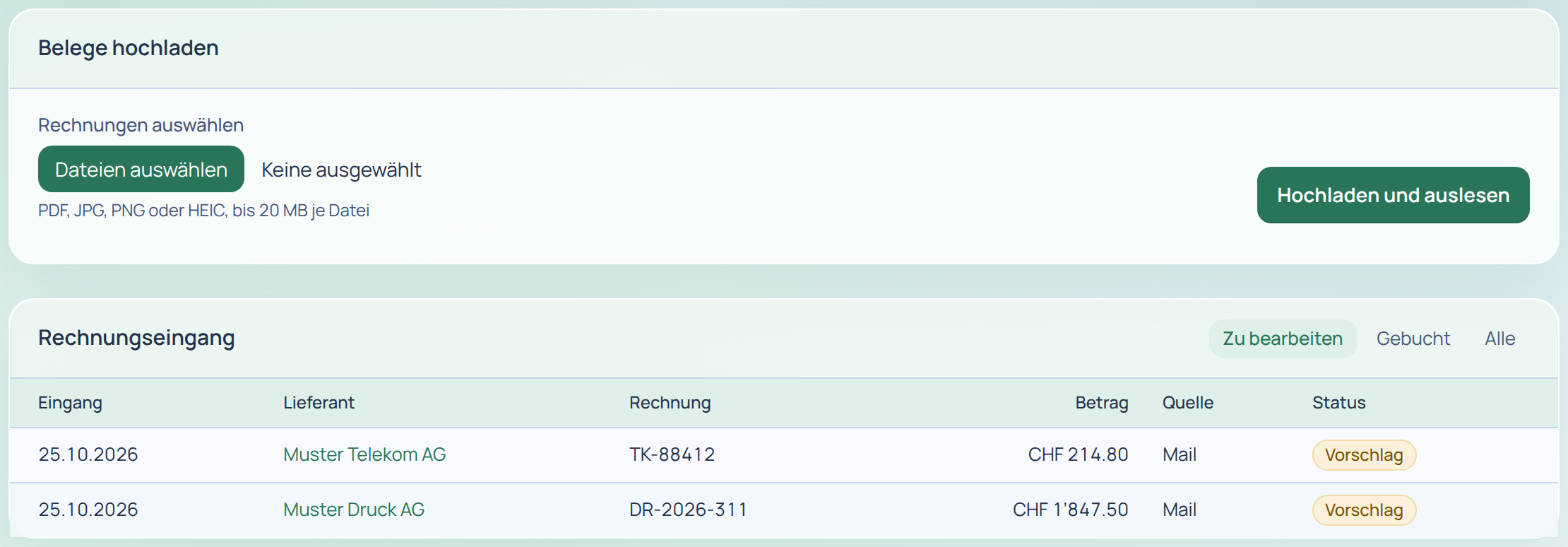
2. Read. Finance first reads Swiss QR Codes from PDF images, vector codes and photos, checks IBAN/reference and reports faulty codes. S1 billing information supplies invoice number, date, UID, VAT rates and terms. Without QR, PDF text supplies IBAN, reference, amount, invoice number, date, terms, UID and VAT rates without AI. Image-only scans without QR yield an amount/IBAN proposal for review, never automatic posting. If unreadable, open the original and complete manually.
3. Retain originals. Each original is immediately stored unalterably with a SHA-256 checksum. Preview/download verify integrity and are logged. Discarding an invoice retains its original. Finance | base does not guarantee GeBüV compliance: this interim checksum solution lacks the timestamp or signature under Art. 9, para. 1(b).
4. Review and post. Proposals show supplier, account, VAT code, cost centre, due date and text, percentage confidence and reasoning (rule/learned). Large screens show original left, proposal right. Posting creates unknown suppliers with invoice address, UID and IBAN. Split across accounts, VAT codes and cost centres; enter exchange rates for foreign currency. “Post proposal” creates an open payable; after edits the button reads “Review and post the modified entry”.
5. Duplicates. Detection uses file, reference/amount, invoice number, and supplier/amount/date. “Duplicate” links to the first receipt; override with “Not a duplicate – process anyway”.
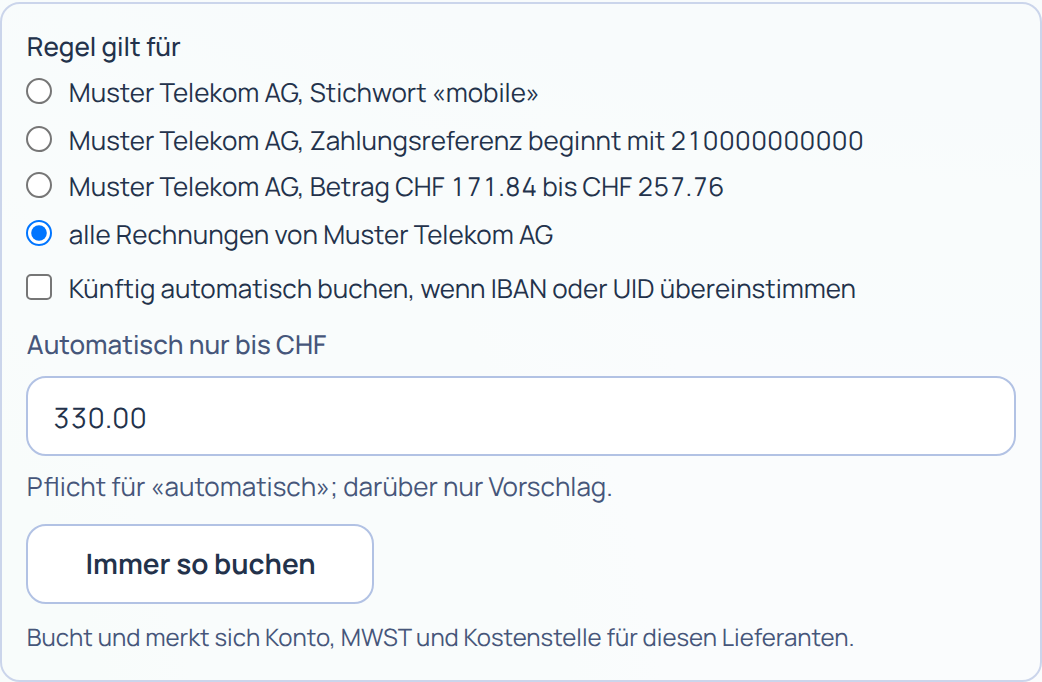
6. Learn rules. “Post and save a rule” applies to all a supplier’s invoices or a contract, keyword, reference, amount range or recipient. Finance learns from every posting. Optional automatic rules require an amount limit, QR code, CHF and an unambiguous match. An issuer name differing from the supplier despite a known IBAN triggers a warning and prevents automatic posting.
Finance | base handles reading and proposals. GeBüV Art. 4 instructions and deciding whether the process meets your needs remain your responsibility. Next: pain.001 payment runs. Try the Demo or open a test account. Further steps are in the Finance | base guide. Questions? See the Contact page.
Sources
- Code of Obligations (OR, SR 220), Art. 957a, paras. 2–3, Art. 958f, paras. 1 and 3, as at 1 October 2026: Fedlex (German original), accessed 26.10.2026.
- Ordinance on the Keeping and Retention of Accounts (Ordinance on Accounting Records, GeBüV, SR 221.431), Art. 2–10, as at 1 January 2013 (version available on Fedlex on 26.10.2026): Fedlex (German original), accessed 26.10.2026.
- VAT Act (MWSTG, SR 641.20), Art. 25, para. 1; Art. 26, para. 2; Art. 28, para. 1; Art. 34, para. 2; Art. 42, para. 6; Art. 70, paras. 2 and 4, as at 1 January 2025: Fedlex (German original), accessed 26.10.2026.
- VAT Ordinance (MWSTV, SR 641.201), Art. 122 (paperless records), as at 1 January 2025: Fedlex (German original), accessed 26.10.2026.
- Federal Tax Administration (FTA): Electronic business transactions (in German), questions and answers, accessed 26.10.2026.
- SIX: Swiss Implementation Guidelines QR-bill, version 2.3, 20 November 2023, sections 4.1–4.3 (data structure, customer references, additional information) and section 6 (Swiss QR Code): PDF (in German); version 2.4, 24 February 2026, effective 14 November 2026: PDF (in German); both accessed 26.10.2026.
This guide does not replace legal or tax advice. Information as at 26 October 2026.