
Red and orange payment slips are obsolete. To create a QR-bill, you need a payment section with a Swiss QR Code. This guide helps SMEs choose the correct IBAN, reference and format, meet the standard and match payments to invoices, simplifying everyday administration.
What a QR-bill is
PostFinance withdrew red and orange payment slips on 30 September 2022, naming QR-bills and eBill as successors. QR-bills were introduced on 30 June 2020; both systems operated during the transition.
Under the Swiss Implementation Guidelines from SIX, a QR-bill is an invoice with a payment section and receipt. The payment section can be integrated into the invoice or enclosed separately. It contains the information needed for payment, both as a QR code and in readable form. The receipt must appear to the left of the payment section. The payment section is DIN A6 landscape (148 × 105 mm), the receipt measures 62 × 105 mm, together measuring 210 × 105 mm. The Swiss QR Code itself is printed at 46 × 46 mm, with a Swiss cross in the centre.
The QR code contains all the information also printed in plain text on the payment section. When paying through e-banking or a banking app, customers scan the code or upload the PDF; the amount, recipient and reference are transferred automatically.
The three variants
Choose your account and reference from three standard combinations:
| Variant | Account | Reference type | Typical use |
|---|---|---|---|
| QR reference | QR-IBAN | QRR (26 digits plus check digit) | Invoices in CHF with automatic payment reconciliation |
| Creditor Reference | IBAN | SCOR (Creditor Reference under ISO 11649, starting with “RF”) | Invoices in CHF and EUR with a regular IBAN; also with automatic reconciliation |
| No reference | IBAN | NON | Simple cases where you match payments manually |
The pairing is strict: a QR-IBAN may only be used with a QR reference, and a regular IBAN only with a Creditor Reference or no reference. Permitted currencies are CHF and EUR, with amounts between 0.01 and 999’999’999.99.
Important for invoices in euros: Under the new version 2.4 of the guidelines (valid from 14 November 2026), QR-IBAN and QR reference are intended only for invoices in CHF. It expressly states that EUR invoices may use only IBAN with a SCOR reference or IBAN with an unstructured message. Version 2.4 requires no technical changes for CHF invoices. Version 2.3 remains valid until November 2027.
How do you recognise a QR-IBAN? QR-IBANs use a dedicated institution identifier (QR-IID) in the range 30000 to 31999. They look like regular Swiss IBANs but contain a number from this range in positions 5 to 9. You obtain a QR-IBAN from your bank; ask them for one.
The QR reference consists of exactly 26 digits followed by a check digit (recursive Modulo 10, the 27th digit). It must not consist entirely of zeros. As the guidelines explain, it enables automatic reconciliation between your invoices and incoming payments: the bank returns the reference with the credit, allowing you to match the payment unambiguously to an invoice.
The Creditor Reference contains 5 to 25 alphanumeric characters, starts with “RF” and has Modulo 97-10 check digits in positions three and four. It works with a regular IBAN for CHF and EUR and likewise enables the recipient to reconcile invoices and incoming payments automatically. It is suitable if your bank does not offer a QR-IBAN or you invoice in euros.
What the payment section must contain
The payment section is strictly standardised. Only headings and information defined in the standard may be printed on it, and it must not be used for advertising. Its main elements are:
- Account / Payable to: the IBAN or QR-IBAN and the payment recipient’s name and address.
- Reference: QR reference or Creditor Reference, where used.
- Additional information: a short free-text message, such as the invoice number.
- Payable by: the payer’s name and address.
- Currency and amount.
If the amount or payer is not printed when the invoice is issued, the payment section and receipt must provide fields for handwritten completion. In everyday terms: include the address and amount on the invoice. Addresses in particular are a frequent source of errors. Since the change in version 2.3 that took effect on 21 November 2025, combined address fields are no longer an option; addresses must be entered separately (street, building number, postcode, town, country). If you use older software, check whether it already supports this. The guidelines expressly point out that the payer’s address should be complete and correct, otherwise processing may be rejected, for example when paying cash at a counter.
If the QR-bill is sent as a PDF, the A6 format of the payment section and receipt must be marked with lines. Each line must also carry a scissors symbol, or the instruction “Separate before paying in” must appear above it. A printed invoice must have perforations between the invoice details and payment section, and between the payment section and receipt.
The QR-bill is not the invoice: VAT details
The payment section deals only with payment. The minimum tax details belong in the invoice itself, rather than on the payment section. Anyone liable for VAT must, on request, issue the recipient with an invoice meeting Art. 26 of the Federal Act on Value Added Tax (VAT Act, MWSTG). The invoice must clearly identify the supplier, recipient and type of supply and generally contain:
- The supplier’s name and location, a statement that they are entered in the register of taxable persons and their registration number
- The recipient’s name and location
- The date or period of the supply, where different from the invoice date
- The type, subject and scope of the supply
- The consideration for the supply
- The applicable tax rate and tax amount payable on the consideration; if the consideration includes tax, stating the tax rate is sufficient
The standard rate under Art. 25 VAT Act (MWSTG), para. 1 is 8.1 per cent. Our guide to Swiss VAT returns explains how to account for VAT correctly.
One more point: invoices are accounting vouchers. Under Art. 958f of the Code of Obligations (CO, OR), para. 1, accounting records and vouchers must be retained for ten years, starting at the end of the financial year. Electronic retention is permitted under para. 3 if correspondence with the business transactions is ensured and the documents can be made readable again at any time. Anyone liable for VAT must retain vouchers until the tax claim reaches its absolute limitation period under Art. 70 VAT Act (MWSTG), para. 2; Art. 958f CO remains reserved.
Practical example: Muster Bau AG
Muster Bau AG is a small, fictional construction company in Musterhausen. It has requested a QR-IBAN from its bank for CHF invoices so payments can be matched automatically. For a residential construction project for Wohnbau Seeblick AG, it issues an invoice with three items in September 2026:
| Item | Description | Quantity | Price | VAT | Amount CHF |
|---|---|---|---|---|---|
| 1 | Bricklayer hour at time-and-materials rates | 64 h | 98.00 | 8.1 % | 6’272.00 |
| 2 | Site manager hour at time-and-materials rates | 12 h | 135.00 | 8.1 % | 1’620.00 |
| 3 | Bag of cement 25 kg | 40 pcs | 14.50 | 8.1 % | 580.00 |
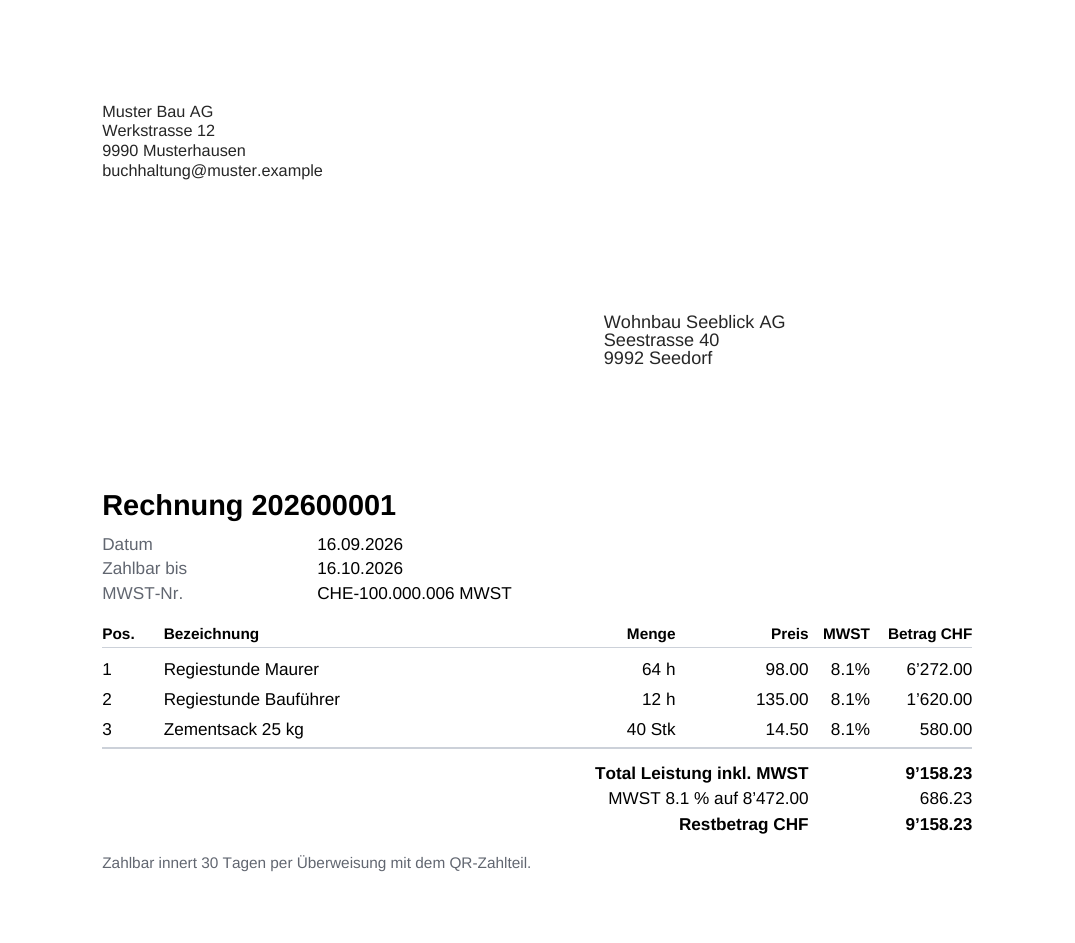
The items total CHF 8’472.00 excluding VAT, plus CHF 686.23 VAT at 8.1 per cent. The invoice amount is CHF 9’158.23. The payment section contains Muster Bau AG’s QR-IBAN, a QR reference and the invoice number as additional information.
Step by step: your first QR-bill
- Clarify the account. For a QR reference, ask your bank for a QR-IBAN; otherwise your IBAN with a Creditor Reference or no reference is sufficient.
- Enter complete sender details. Your company’s name, street, postcode and town and, if liable for VAT, its VAT number.
- Check the customer address. The customer’s street, postcode and town must be correct and complete.
- Set the items, tax rate and due date. State a clear payment term.
- View the preview. Check that the reference, amount and address appear correctly on the payment section.
- Finalise and send the invoice. By email as a PDF or on perforated paper.
- Reconcile and file the incoming payment. The reference matches the credit to the invoice; retain the invoice as an accounting voucher for ten years.
Matching payments automatically
The benefit of a structured reference becomes clear after sending: your bank supplies account transactions as a camt file containing the reference for each credit, and software matches the payment to the invoice automatically. Only exceptions such as partial payments or payments without a reference remain. See Bank reconciliation with camt files for details; if payment fails to arrive, see Write a payment reminder.
Checklist
- QR-IBAN requested from the bank or regular IBAN deliberately retained
- Reference type matches the account type (QRR only with QR-IBAN, SCOR or NON only with IBAN)
- Complete sender details including address and VAT number
- Complete, structured recipient and payer addresses (street, building number, postcode, town, country)
- Euro invoices: IBAN with Creditor Reference or no reference, no QR-IBAN
- Correct amount and currency (CHF or EUR)
- Invoice number included as additional information on the payment section
- PDF: separation lines with scissors symbol or “Separate before paying in” instruction
- Paper: perforations
- VAT details under Art. 26 VAT Act (MWSTG) in the invoice
- Retention for ten years ensured
How KMU | base helps
The screenshots show the interface in German; KMU | base is also available in French, Italian and English.
Finance | base creates the payment section from your master data.
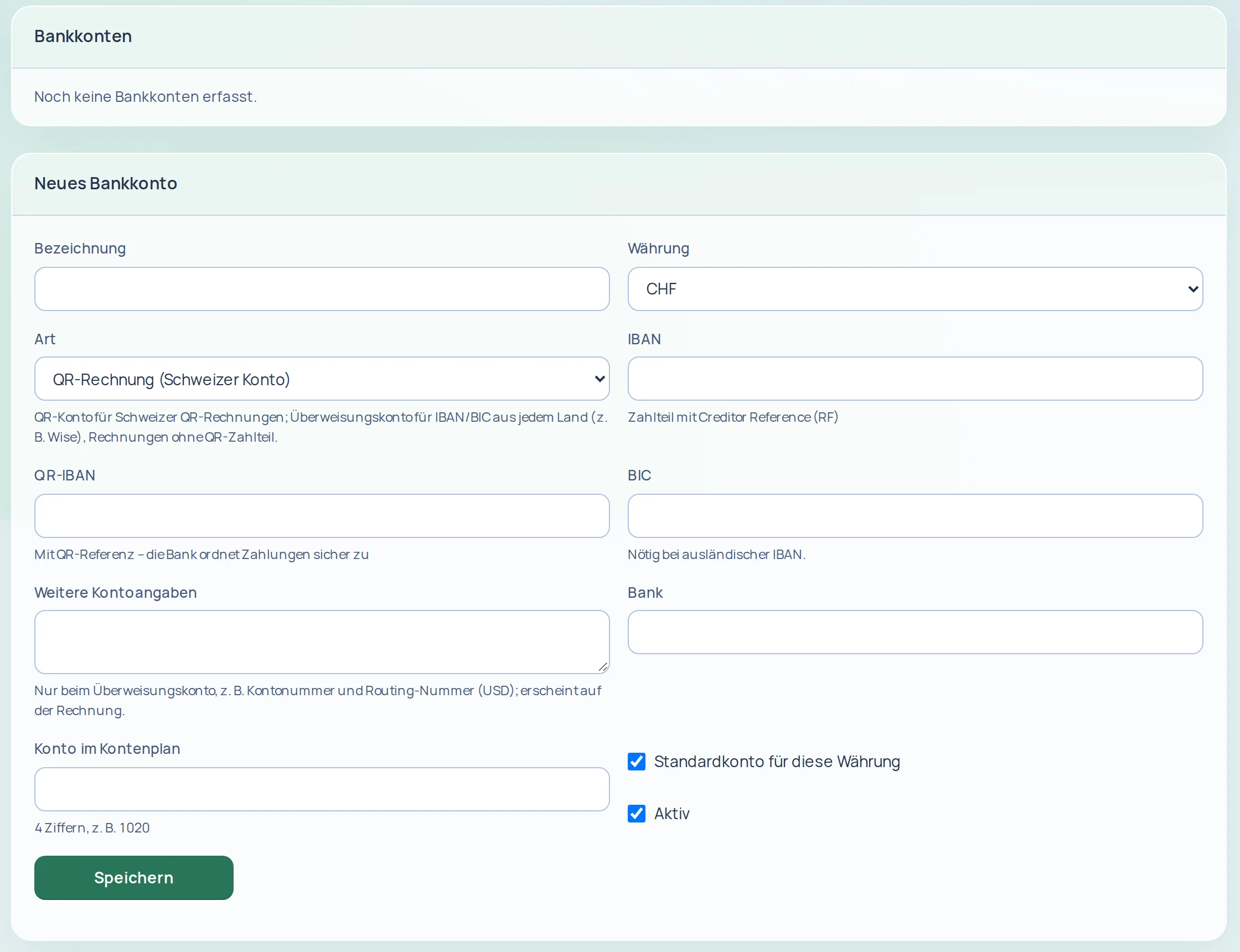
1. Add a bank account. In Invoicing settings, the Bank accounts tab lets you maintain several bank accounts with IBAN or QR-IBAN. Set a default account for each currency and deactivate old accounts. When entering an account, choose between a QR account for Swiss QR-bills and a bank transfer account.
2. Create and check the invoice. Enter items in the document editor and view a PDF preview before issuing. An invoice can only be issued with valid bank details and a complete sender address (without a Swiss account, use bank transfer details or PayPal, see point 4); quotes, invoices and credit notes also require a complete customer address (street, postcode, town). The editor explains what is missing, and drafts can still be saved. If bank details, sender details or the customer address are missing, Finance | base blocks issuing.
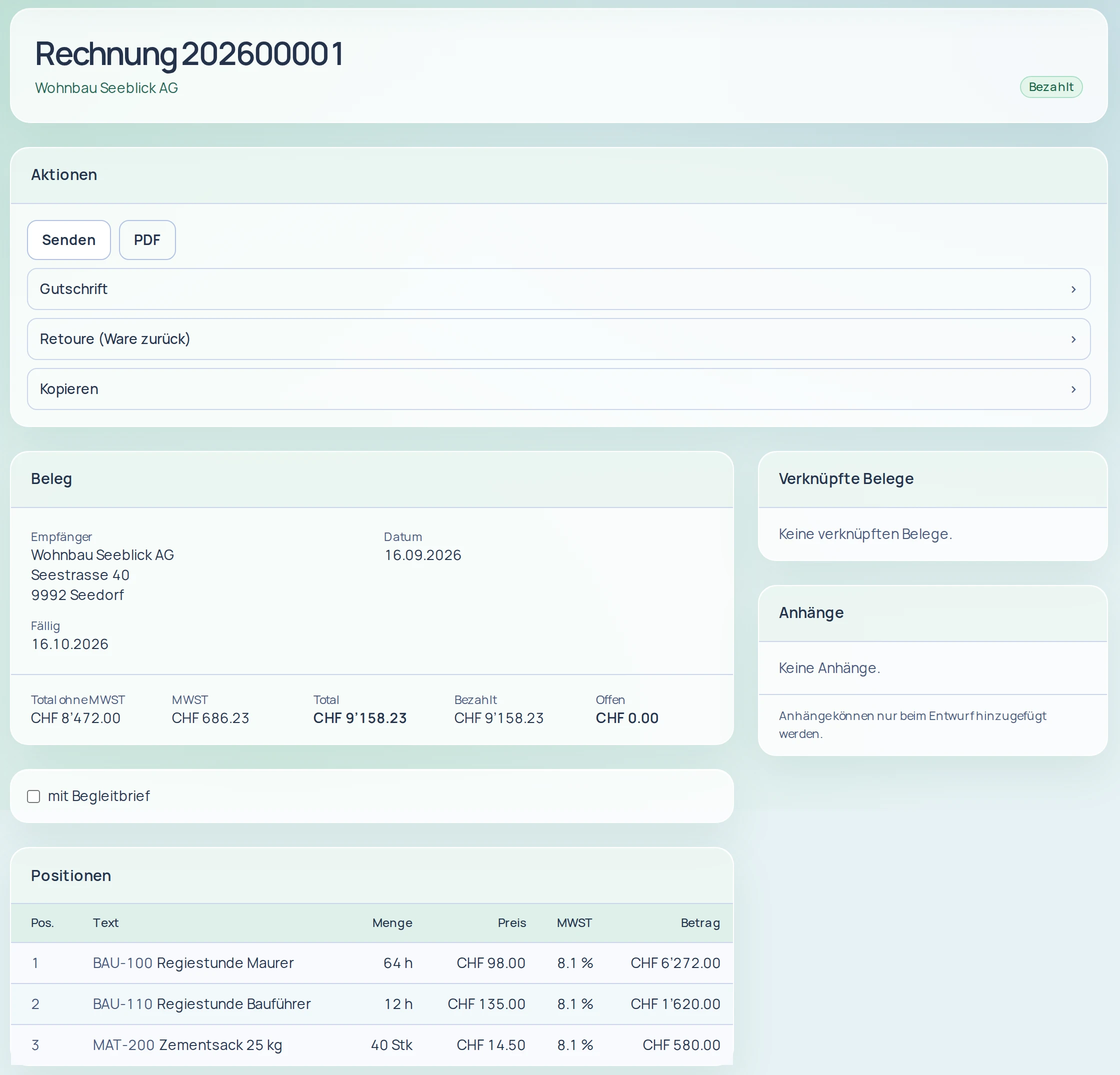
Once the invoice is issued, the Send and PDF actions appear at the top, with recipient, due date, totals and items below:
3. PDF with QR payment section. Your documents are generated as PDF/A. Invoices and payment reminders carry a QR payment section with QR-IBAN and QR reference or with IBAN and RF reference (Creditor Reference). The example shows the Muster Bau AG invoice from this guide:
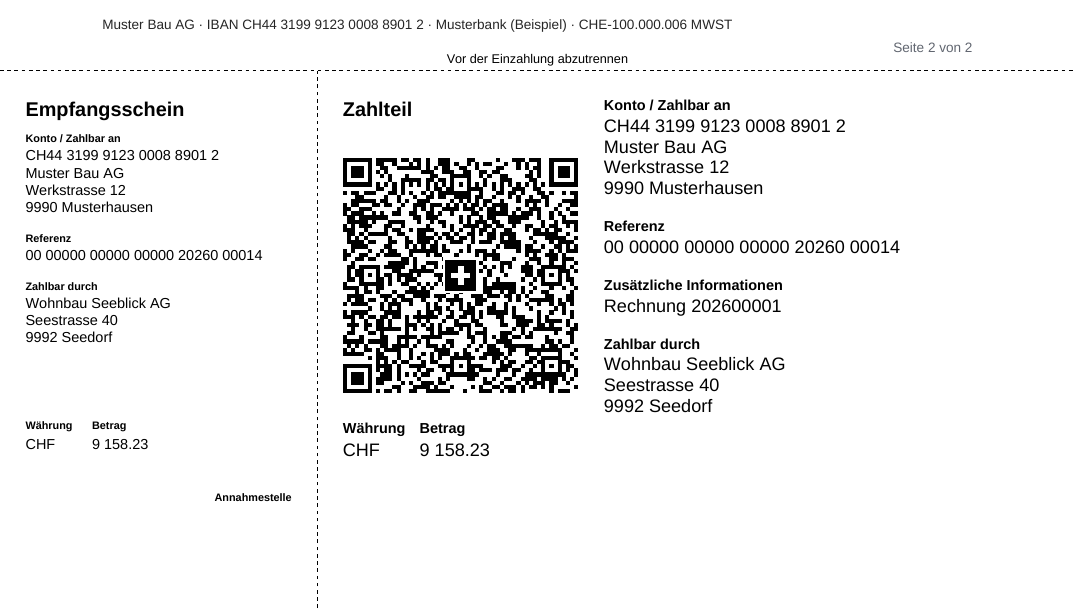
Page 2 contains the payment section with receipt, Swiss QR Code, reference, invoice number as additional information and amount:
4. Without a Swiss account. If you have no Swiss bank account, issue invoices payable by bank transfer (IBAN and BIC from any country, or free-form account details) or PayPal only. The PDFs then show payment details in place of the QR payment section.
5. Match payments. Upload the bank file (camt.053 or camt.054): payments with a QR or RF reference are matched to the invoice automatically; the rest await your allocation. The same file and bank transaction are never imported twice. For overpayments and underpayments, set a tolerance and decide whether overpayments remain as customer credit, count as tips or are earmarked for refund.
View the demo or open a trial account. Questions: see the Contact page.
Sources
- SIX: Swiss Implementation Guidelines QR-bill, version 2.3 (document dated 20 November 2023, changes effective since 21 November 2025), ch. 2 (definitions, QR-IID, QR reference, Creditor Reference), ch. 3 (payment section), ch. 4 (addresses, references) and ch. 6.4 (QR code dimensions); also version 2.4 of 24 February 2026 (valid from 14 November 2026, change log on EUR invoices); version 2.3 remains valid until November 2027. Version 2.3 (in German) · Version 2.4 (in German) · Overview (in German), accessed on 26.10.2026.
- PostFinance: Current payment slips withdrawn from the market on 30 September 2022 (in German), accessed on 26.10.2026.
- Federal Act on Value Added Tax (VAT Act, MWSTG, SR 641.20), Art. 25, para. 1, Art. 26, para. 2, Art. 70, para. 2, as at 1 January 2025: fedlex.admin.ch (German original), accessed on 26.10.2026.
- Code of Obligations (CO, OR, SR 220), Art. 958f, paras. 1 and 3, as at 1 October 2026: fedlex.admin.ch (German original), accessed on 26.10.2026.
This guide does not replace legal or tax advice. Information as at 26 October 2026.