
Anyone liable for VAT reports regularly to the Federal Tax Administration (FTA): you declare turnover, deduct input tax paid and transfer the balance. The Swiss VAT return follows a fixed process with fixed deadlines, and since 2025 it has been entirely online. This guide explains the available periods, the latest dates for reporting and payment, how the return is structured and how to derive it properly from your accounts.
Who reports, and how often
Anyone entered in the VAT register as a taxable person must file returns. Those generating less than CHF 100’000 turnover within a year in Switzerland and abroad from supplies not excluded from tax are exempt from tax liability (Art. 10 of the Federal Act on Value Added Tax (VAT Act, MWSTG), para. 2, let. a). This exemption can be waived (Art. 11 VAT Act (MWSTG)). Once registered, the following reporting schedule applies (Art. 35 VAT Act (MWSTG)):
| Situation | Reporting period | Provision |
|---|---|---|
| General rule (effective method) | Quarterly | Art. 35, para. 1 |
| Reporting using net tax rates | Half-yearly | Art. 35, para. 1 |
| On request, with regular input tax surpluses | Monthly | Art. 35, para. 1bis, let. a |
| On request, with annual turnover from taxable supplies of no more than CHF 5’005’000 | Annually | Art. 35, para. 1bis, let. b |
| In justified cases, on request and with FTA approval | Another period | Art. 35, para. 2 |
To switch to annual reporting, all returns for the previous three tax periods or, if registered for less time, since registration must have been filed on time and tax claims paid in full on time. Previous-period turnover must meet the limit; apply through the FTA portal within 60 days after the start of the desired tax period (Art. 76b MWSTV). Newly registered taxpayers apply through the FTA portal within 60 days after notification of their VAT number; expected turnover including VAT for the first twelve months must meet the limit (Art. 76a MWSTV).
Deadline, payment and extensions
The return and balance payment are due within 60 days after the reporting period ends:
- Submission: You must file without being prompted within 60 days of the reporting period ending (Art. 71 VAT Act (MWSTG), para. 1).
- Payment: Within the same 60 days, you must settle the tax claim less paid annual instalments (Art. 86 VAT Act (MWSTG), para. 1).
For annual reporting, the FTA invoices provisional instalments: payable within 150, 240 and 330 days after the tax period starts for the effective and flat tax rate methods, and within 240 days for net tax rates. Paid instalments are credited against the annual return (Art. 86a VAT Act (MWSTG)); late or incomplete instalments incur default interest without a reminder (Art. 87, para. 1bis).
For the 1st quarter, this means the period ends on 31 March and the 60 days end on 30 May. Late payment incurs default interest without a reminder (Art. 87 VAT Act (MWSTG), para. 1). If no payment or an obviously insufficient payment is made, the FTA initiates debt enforcement for the provisional amount due after a prior reminder. If no return or an obviously insufficient return has been filed, it first determines the provisional amount due using its proper discretion (Art. 86 VAT Act (MWSTG), para. 2). If the return produces a credit balance, the FTA pays it out (Art. 88 VAT Act (MWSTG), para. 1).
If you need more time, you can extend the submission deadline free of charge online in the FTA portal. The FTA cannot approve applications made outside the portal. The portal shows the exact deadline; if it falls on a weekend or public holiday, clarify it there.
Online only: the FTA portal
Since 1 January 2025, all businesses liable for VAT must submit returns online in the FTA portal (Art. 123 of the Value Added Tax Ordinance (MWSTV), para. 2, let. g; FTA). Paper forms are no longer available, including for previous periods. Since 11 May 2026, only the “MWST-Abrechnung pro” service has been available; the former “easy” version has been discontinued. Registration is through “myESTV” using the government login AGOV.
The portal offers XML import: accounting software exports the period as an eCH-0217 file, and “MWST-Abrechnung pro” imports it and recognises the business and period automatically. The FTA accepts only files conforming to eCH-0217, E-MWST specification version 2.0.0; other versions are no longer supported. Check the values after import and add anything missing. Submission always takes place in the portal.
Structure of the return by box
The effective-method return is divided into numbered boxes. The main ones, based on FTA VAT Info 15 (sections 1.3 and 1.4, effective from 31 October 2025):
| Box | Content |
|---|---|
| 200 | Total turnover for the period (consideration) |
| 289 | Total deductions from turnover, for example for supplies located abroad or supplies exempt from tax |
| 299 | Total taxable turnover: box 200 less box 289 |
| 303 / 313 / 343 | Tax on supplies from 1 January 2024: standard rate 8.1 %, reduced rate 2.6 %, accommodation rate 3.8 % (until 31 December 2023: boxes 302 / 312 / 342 at 7.7 %, 2.5 %, 3.7 %) |
| 383 (382) | Acquisition tax on supplies from foreign businesses |
| 399 | Total tax due |
| 400 | Input tax on cost of materials and services |
| 405 | Input tax on investments and other operating expenses |
| 410 | Subsequent input tax deduction and adjustments following a change of method |
| 415 | Input tax corrections, for example for mixed use or own consumption |
| 420 | Input tax reductions, for example for subsidies |
| 479 | Total input tax deductions: 400, 405 and 410 less corrections and reductions 415 and 420 |
| 500 / 510 | Amount payable / credit balance |
Important when rates change: the decisive factor is the date or period of the supply, not the invoice or payment date. The rates in the table apply according to the FTA (“Swiss VAT rates” page, accessed on 26 October 2026); the accommodation rate is time-limited under Art. 25 VAT Act (MWSTG), para. 4, currently until no later than 31 December 2027.
Under the effective method, the tax claim is the difference between tax due and the input tax credit for the period (Art. 36 VAT Act (MWSTG), para. 2). If the tax due is greater, you pay the difference (box 500); otherwise you have a credit balance (box 510). Whether tax arises on invoicing or payment depends on the accounting basis (Art. 39 and 40 VAT Act (MWSTG)); see Agreed or received consideration.
Practical example: Lichtwerk Elektro AG
Lichtwerk Elektro AG is a fictional electrical installation business in Musterhausen. It uses the effective method, on an agreed-consideration basis, quarterly. The following figures apply to the 3rd quarter of 2026 (1 July to 30 September):
| Item | Amount CHF |
|---|---|
| Consideration from domestic installation work, excluding VAT | 186’400.00 |
| Consideration for planning services to a business in Germany (place of supply abroad) | 12’600.00 |
| Input tax on materials and third-party services | 7’890.55 |
| Input tax on investments and other operating expenses | 1’236.30 |
| Input tax correction for mixed use of a device | 150.00 |
The calculation:
- Box 200 (total turnover): 186’400.00 + 12’600.00 = CHF 199’000.00.
- Box 289 (deduction for supply abroad): CHF 12’600.00.
- Box 299 (total taxable turnover): 199’000.00 − 12’600.00 = CHF 186’400.00.
- Box 303 (tax at 8.1 per cent): 186’400.00 × 0.081 = CHF 15’098.40. This is also box 399.
- Box 479 (input tax deductions): 7’890.55 + 1’236.30 − 150.00 = CHF 8’976.85.
- Box 500 (payable): 15’098.40 − 8’976.85 = CHF 6’121.55.
Lichtwerk Elektro AG submits the return in the FTA portal within 60 days after 30 September 2026 and transfers CHF 6’121.55 within the same deadline.
Step by step: from accounts to return
- Clarify status. Are the method, accounting basis and period correct in the system, and from when do they apply?
- Update the accounts. Invoices and payments for the period are posted, and each voucher has the appropriate VAT code.
- Determine turnover. Total turnover, deductions and turnover per tax rate (boxes 200 to 399).
- Determine input tax. Input tax on materials, services, investments and other expenses, plus corrections and reductions (boxes 400 to 479).
- Add information outside the accounts. Subsequent input tax deductions, input tax corrections and reductions, subsidies or donations often do not appear in the journal and are entered manually.
- Reconcile. Compare posted tax (output tax less input tax) with the return. If a difference remains, find the cause before submitting.
- Submit in the FTA portal. Import the file or enter values, check, submit.
- Pay and file. Pay within the deadline and retain the return in the voucher and posting archive. Under Art. 70 VAT Act (MWSTG), para. 2, accounting records and vouchers must be retained until the tax claim reaches its absolute limitation period; Art. 958f of the Code of Obligations (CO, OR) remains reserved.
Errors discovered later?
If you discover errors in your returns when preparing the annual accounts, you must correct them no later than in the return for the period containing the 180th day after the end of the financial year (Art. 72 VAT Act (MWSTG), para. 1). Identified errors from earlier periods must be corrected retrospectively as long as the claim has not become final or time-barred (Art. 72, para. 2). Since 2025, corrections are made online in the portal. A correction return is available for individual monthly, quarterly or half-yearly returns, and an annual reconciliation after the annual accounts. See Input tax deduction and VAT correction returns.
Checklist
- VAT number, method, accounting basis and period correctly stored in the system
- All invoices and payments for the period posted
- VAT codes checked on all vouchers, including acquisition tax and supplies abroad
- Turnover separated by tax rate, with rate based on supply date
- Input tax corrections, subsequent input tax deduction and subsidies considered
- Posted tax reconciled with the return
- Deadline recorded (60 days after period end)
- Access to “MWST-Abrechnung pro” set up (practical tip: avoid depending on just one person)
- Return submitted, payment initiated, documents filed
How KMU | base helps
The screenshots show the interface in German; KMU | base is also available in French, Italian and English.
In Finance | base, the return is generated from your postings. Find the area in the sidebar under Accounting › VAT.
1. Set status. Under VAT status from date, specify per company from a given date whether it is liable for VAT, with VAT number (the UID check digit is validated), method, accounting basis and period. The history remains visible.
2. Monitor periods. The period overview with deadline shows all periods for each year with “Open”, “Draft” or “Closed” status and the 60-day deadline; overdue deadlines appear in red.
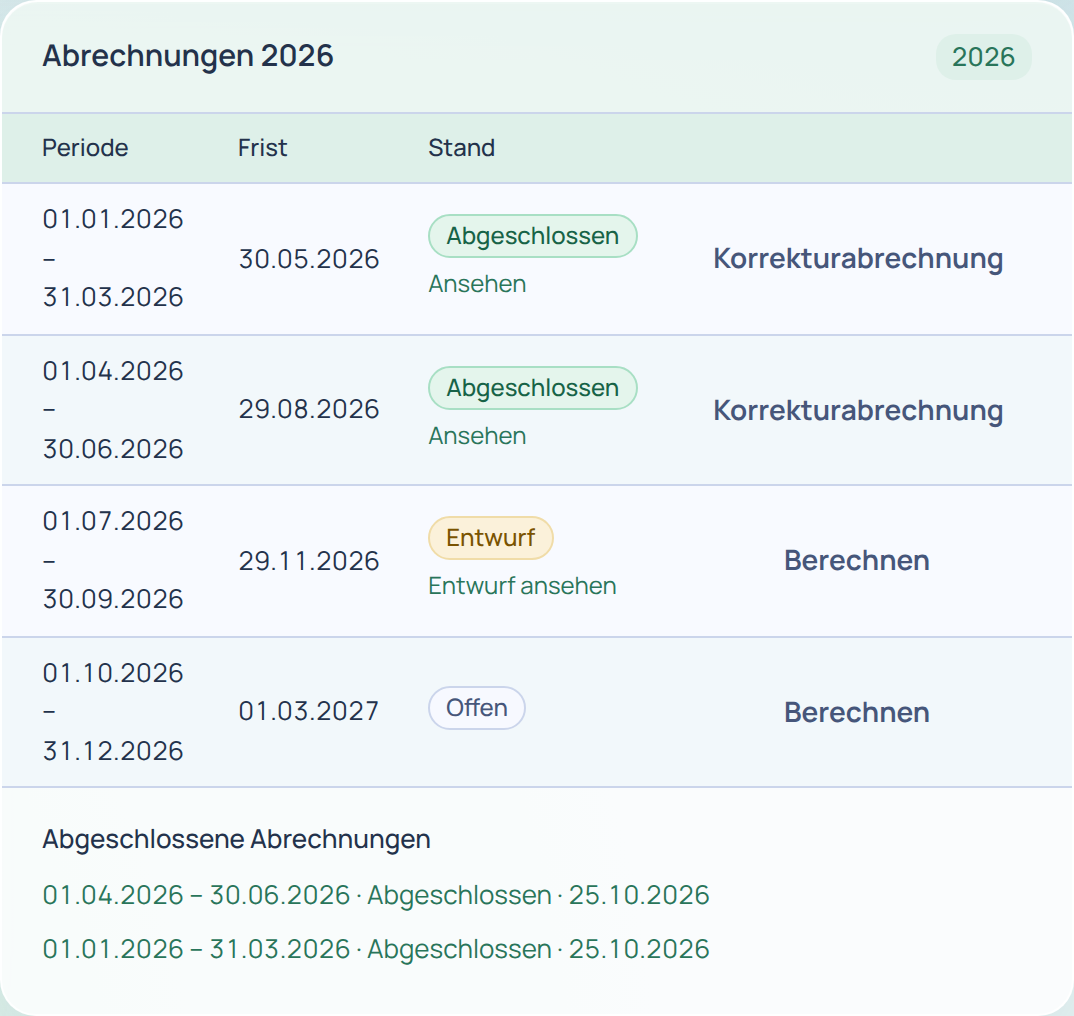
3. Calculate the return. Calculate creates a draft from the postings using the FTA form boxes, with turnover and tax per rate. Each posting uses the rate valid on its date. However, the supply date determines the tax rate (see above): check supplies spanning a rate change manually.
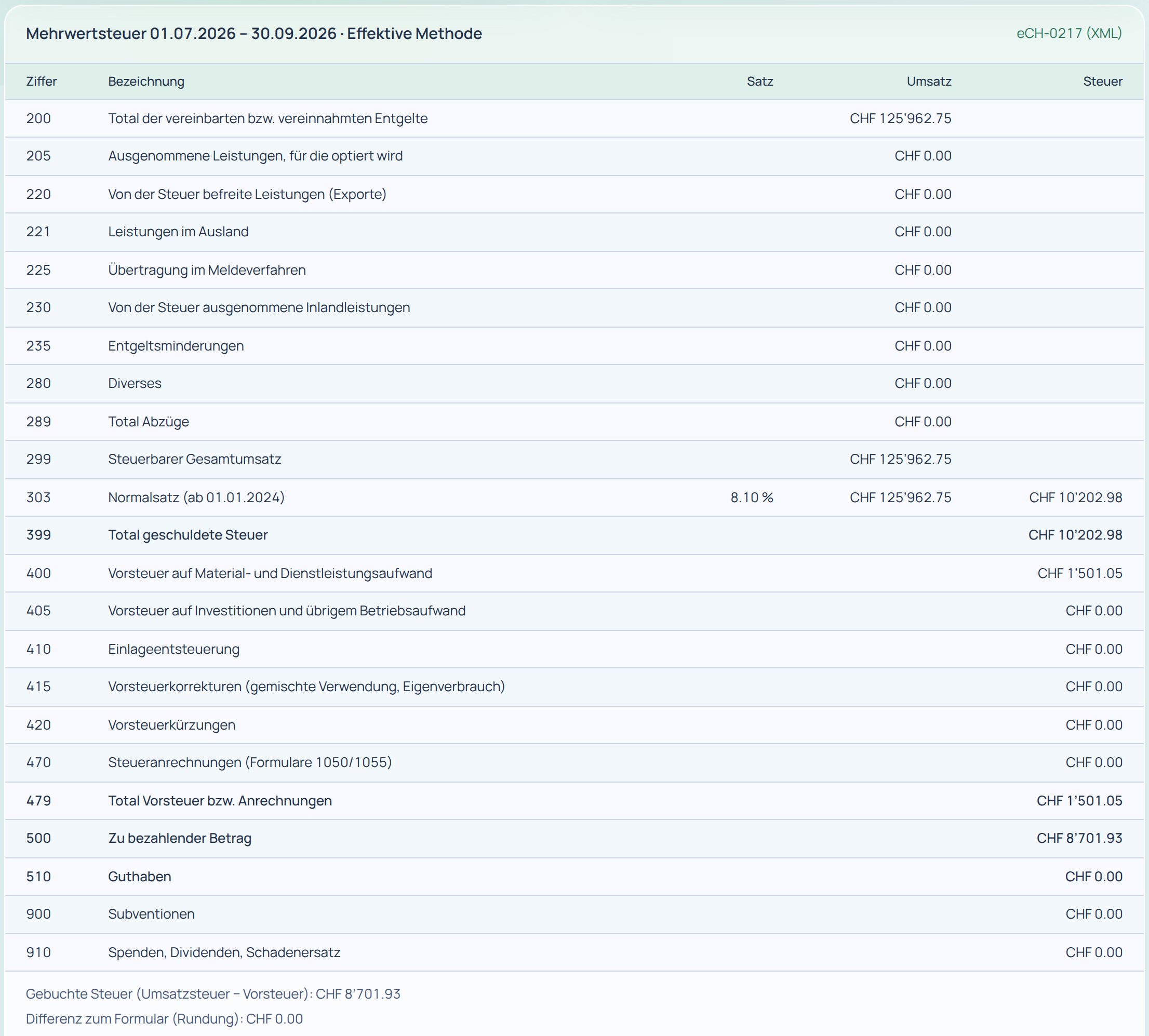
4. Add information and reconcile. Under Information outside the accounts, enter values such as subsequent input tax deduction, input tax corrections and reductions, subsidies and donations directly in the return. Before closing, you see posted tax and the difference to the return.
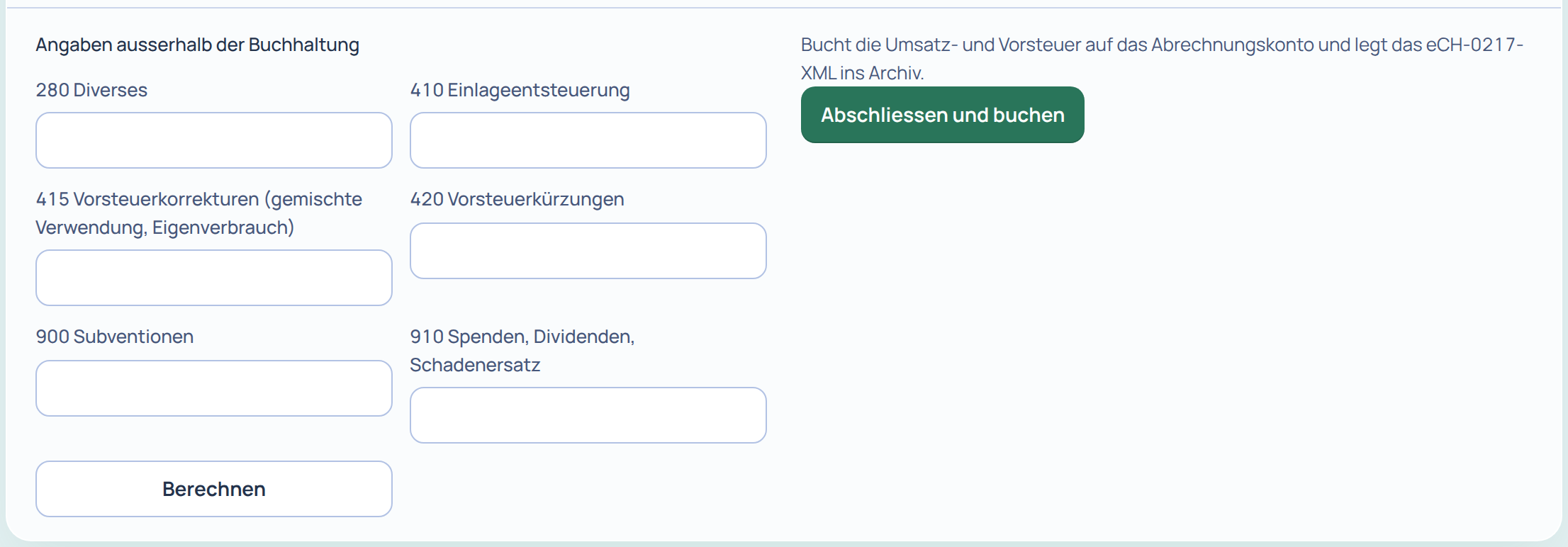
5. Close. Close and post posts the balancing entry to the VAT settlement account and stores the XML file immutably in the voucher archive. Closing is possible only if the draft matches the current posting state. The “Close” permission level determines who may close.
6. Submit in the FTA portal. Use eCH-0217 (XML) to download the return as an eCH-0217 file; the download is logged. Finance | base does not submit it; you submit it yourself in the FTA portal. The downloaded file currently conforms to eCH-0217 version 1.0, whereas the portal requires version 2.0.0. Import is therefore not guaranteed. Until the changeover, transfer the values from the draft manually into “MWST-Abrechnung pro”.
To try it yourself, view the demo or open a trial account. The Finance | base guides explain further steps. For questions, use our Contact page.
Sources
- Federal Act on Value Added Tax (VAT Act, MWSTG, SR 641.20), Art. 10, para. 2, let. a, Art. 11, Art. 25, para. 4, Art. 35, 36, para. 2, 39, 40, 70, para. 2, 71, para. 1, 72, 86, 86a, 87, paras. 1 and 1bis and 88, para. 1, as at 1 January 2025: fedlex.admin.ch (German original), accessed on 26.10.2026.
- Value Added Tax Ordinance (MWSTV, SR 641.201), Art. 76a, 76b, 123, para. 2, let. g, as at 1 January 2025: fedlex.admin.ch (German original), accessed on 26.10.2026.
- FTA: Submit VAT returns online (in German) (mandatory from 1.1.2025, “MWST-Abrechnung pro” from 11.5.2026, XML import eCH-0217 version 2.0.0), Deadline extension (in German), Annual reporting (in German), Annual reconciliation (in German), accessed on 26.10.2026.
- FTA: Swiss VAT rates (in German) (standard rate 8.1 %, reduced rate 2.6 %, accommodation 3.8 %), accessed on 26.10.2026.
- FTA: VAT Info 15 Reporting and payment of tax, sections 1.3 and 1.4 (Part two: Tax calculation) (in German), effective from 31.10.2025, accessed on 26.10.2026.
This guide does not replace legal or tax advice. Information as at 26 October 2026.